
12 Layers Every AI User Should Understand in 2026
See where each layer fails, and you'll know where real work breaks. You use AI every day. ChatGPT for answers, Claude Code or Codex for code, Perplexity for research. More and more people now have
Written by
Voxyz AI
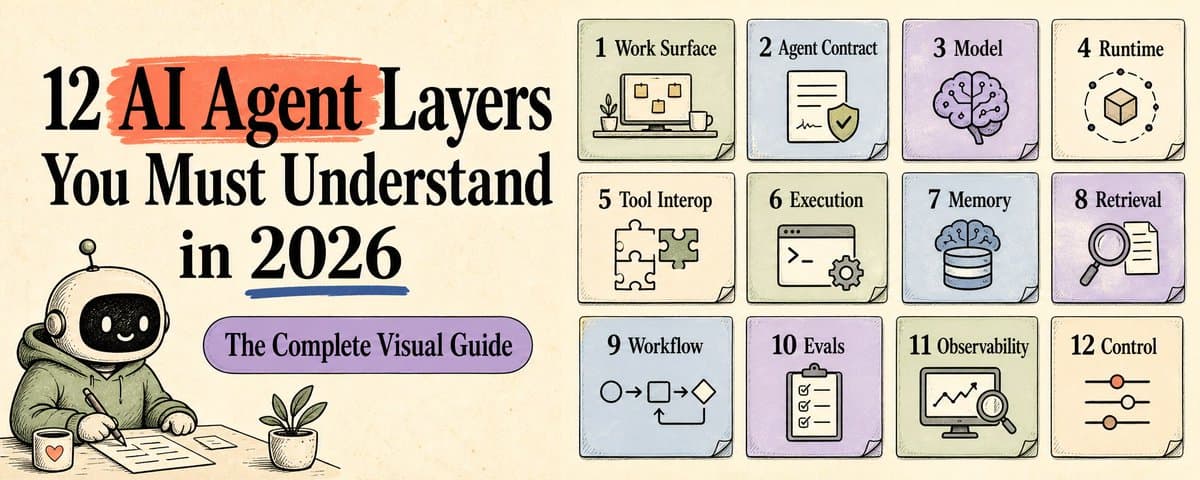
See where each layer fails, and you'll know where real work breaks. You use AI every day. ChatGPT for answers, Claude Code or Codex for code, Perplexity for research. More and more people now have their own AI agent. It checks your email, crunches your data, builds memory about you. But you've probably run into this: → The same tool answers sharply today, then talks complete nonsense tomorrow → Ask ChatGPT and Claude the same question, get completely different answers → New tools launch every week. They all sound impressive. You have no idea which one fits into real work These problems all trace back to how AI tools are built. Once you have the mental model below, agents stop feeling so complicated. An AI agent is built from 12 layers. Each layer does something different. Each layer can fail in its own way. No code required. One read is enough. For each layer, one question: if it's missing, where does real work break? Save this. Next time you see a new tool, you'll know where it fits. PART 1: The Foundation (where it lives, who it is, what brain it uses)
- Work surface (where humans meet it)
Where people send tasks, check results, edit drafts, give approvals. The ChatGPT chat box, Claude desktop app, Cursor editor, agent comments inside Linear / Notion-style work tools. These are all work surfaces. → Chat box = generic entry point → Editor = where you write code → Ticket system = team workflow → Browser extension = embedded in what you're already doing Without it, the agent looks smart in demos but never enters real work. Whether an agent actually enters your daily life starts here. 2. Agent contract / spec (the job description)
The easiest layer to skip. Also the one that most directly decides whether an agent can be trusted. It defines who the agent is: → Its role (researcher / editor / operator / approver) → What it owns, what it doesn't → What the output should look like → When it must hand back to a human → How to handle failure Without this layer, the agent always feels like a temp worker. It gets things done, but its responsibilities drift. The OpenAI Agents SDK docs also treat "define one specialist cleanly" as the explicit starting point of agent design. Concrete example. OpenClaw (an open-source agent framework) puts an agent's personality into its own file: SOUL.md. It spells out how the agent should talk (short over long, take a stance, call out bad ideas directly) and how it shouldn't (filler openers, over-politeness, fence-sitting). The difference looks like this: → Weak version: Maintain professionalism and provide comprehensive assistance. → Strong version: Just answer. No "happy to help" opener. One sentence if one sentence works. Call out bad ideas early. That's what a contract looks like in practice. Write it line by line, and the agent becomes steady. Contract is the bridge from "useful once" to "trustworthy repeatedly." 3. Model (the brain)
Reasoning, coding, multimodality, speed, cost. GPT-5 / GPT-5.5, Claude 4.x, Gemini 3.x, Llama 4 all live in this layer. → Stronger model: higher ceiling on complex tasks → Faster model: lower cost, runs in more places → Weak model: you'll blame the AI when the real issue is how you're using it But a strong model doesn't mean the system is trustworthy. How the agent runs, how it remembers, who controls it: the model layer doesn't decide any of that. Most agent failures hide in the other layers. PART 2: How It Actually Runs (runtime + the outside world) 4. Runtime / state (loop and state)
A single LLM call is just one generation. An agent has to chain many generations, tool calls, and saved state into a loop: think → act → observe → repeat. Runtime is that loop. → Plan (break down the task) → Act (call tools) → Observe (look at results) → Retry (on failure) → Handoff (pass to another agent) → State (persist all of the above) Without it, an agent is a one-shot helper. It can answer once but can't finish a real task. Examples: OpenAI Agents SDK, LangGraph, Claude Agent SDK. 5. Tool & agent interop (the protocol layer)
An agent can't do everything by itself. It needs to call external tools, read external data, collaborate with other agents. Think of the world before USB-C: every device had its own connector, you carried a bag of cables. Agents connecting to tools used to feel the same way. Every integration was a one-off script. In 2026, this layer is entering its own USB-C moment: → MCP (Model Context Protocol): the agent ↔ tools/data/resources protocol. Now under the Linux Foundation's Agentic AI Foundation, with 10,000+ public servers, adopted by ChatGPT, Cursor, Gemini, Copilot, and VS Code. → A2A (Agent-to-Agent): the agent agent collaboration protocol. Google donated it to the Linux Foundation in 2025; by 2026 the Linux Foundation reports 150+ organizations participating or supporting. Without this layer, every integration becomes glue code built from scratch. At scale, tool discovery breaks, identity gets confused, permissions slip, and agents can't cooperate. MCP lets agents plug into tools. A2A lets agents plug into other agents. Two different lines. In 2026, neither can be skipped. 6. Execution surface (where the agent acts)
Where the agent actually takes action. → Code (repos, files, command line) → Browser (web pages, web apps) → API (calling external services) → Desktop operations (click, type) Without it, the agent can only suggest, never act. It becomes a very expensive chatbot. But fuzzy boundaries are worse. Can act + no rollback + no logs = real incidents. Examples: Claude Code, ChatGPT computer use, Browser Use, Cursor edit. Whenever an agent takes action, always read this layer together with layer 12 (control plane). PART 3: What It Remembers, Looks Up, Ships 7. Memory (what it keeps for itself)
LLMs themselves don't have long-term memory. ChatGPT and Claude can remember your preferences now, but that's something the product layer added on top. An agent has to design this layer itself. Memory is where the agent stores your preferences, project state, past decisions, long-term facts. It's like a person's notebooks: today's sticky note, this week's to-do list, the journal from three years ago. Mix them up and everything gets messy. It comes in at least 6 layers: → Hot session (working memory for this task) → Day-state (today's whiteboard of actions) → Project memory (long-running lessons) → Retrieval index (candidate material) → Canonical policy (long-term rules) → Direct instruction (the user's latest input) Without it, the agent loses its memory every time. And just having memory isn't enough. When it breaks, it's worse: old memory overrides new decisions. A preference you stated three months ago is still steering today's output, even though you changed your mind last month. The test: can it layer, cite sources, and expire. All three, and memory becomes an agent's asset. Miss any one, and it's an invisible bug. (Wrote about how to design this layer last week: A Framework for Agent Memory.) 8. Knowledge / retrieval (what it goes to find)
Memory is what the agent keeps itself. Knowledge is what it goes to find. → Docs, wikis, notes → Code repos, PRs, commits → Slack, email, transcripts → Company databases, Notion, Linear Without it, the agent answers with confidence but can't back any of it up. RAG, vector search, graph search, keyword search: all tools in this layer. Finding is just step one. Finding the right thing + citing the source is what makes the answer trustworthy. Examples: Pinecone, Qdrant, Weaviate, pgvector, plus open-source projects like GBrain that mix memory + retrieval. 9. Durable workflow / orchestration (long flows you can resume)
Running an agent once is easy. Running it reliably is hard. It's like flight rescheduling: bad weather grounds your plane, but you don't restart from the original airport. You pick up at the nearest one. Agents running long tasks need the same thing. In real work, agent tasks often need to: → Run for hours or days (not seconds) → Pause for human approval mid-flight → Resume after a dropped connection → Retry after partial failure, not start over from scratch → Produce concrete artifacts (code PRs, reports, draft emails) → Pick up previous state on the next run That's the durable workflow / orchestration layer. Temporal announced the OpenAI Agents SDK + Temporal Python SDK integration GA in March 2026, emphasizing that agent workflows survive rate limits, network issues, and crashes. Without it, an agent can finish one task for you, but it's hard to schedule, reuse, recover, or audit. Examples: Temporal, Inngest, Restate, Trigger.dev, Cloudflare Workflows. PART 4: Why You Can Trust It (the boring layers that decide everything) 10. Evals (the pre-launch health check)
Agents that pass demos collapse the moment they touch real work. The gap is eval. → Offline eval (pre-launch: fixed question set, measure accuracy, cost, error patterns) → Online eval (post-launch: real-user A/B, shadow traffic, regression monitoring) → Policy tests (deliberate hard cases: forbidden actions, weird inputs, jailbreak attempts) → Edge cases (the corner scenarios you worry about, auto-run them) LangChain's 2026 State of Agent Engineering report surveyed 1,300+ professionals: quality is the biggest blocker for deploying agents in production, and about a third of companies name it the primary barrier. Eval is the pre-launch health check. Without it, you don't know whether the agent is actually stable, or whether the demo just happened to work. Examples: Braintrust, LangSmith eval, OpenAI evals, Promptfoo. 11. Observability / artifacts (the security camera)
When an agent goes wrong, can you reconstruct what happened? The agent itself may not remember. The LLM forgets the moment its loop ends, so you need an outside camera to see what happened. That's the problem observability solves. → Trace (which tools were called this run, which path it took) → Logs (each step's input, output, cost, latency) → Artifacts (files it produced, emails it sent, PRs it touched) → Decisions (where it retried, where it handed off, where it aborted) → Source chain (where each conclusion came from) Without it, the agent is a black box. Nobody can debug it. Nobody dares to use it. In the same LangChain survey, 89% of responding organizations had some form of observability on their agents. Among agent builders, this layer is already baseline. Examples: LangSmith, Arize, Helicone, Logfire, Phoenix. 12. Control plane / governance (the keycard)
The last layer, and the most underrated. Control plane decides who the agent acts on behalf of, what it can read, what it can write, what it can run, how much it can spend, where it can publish. → Identity (whose identity the agent uses) → Permissions (which tools it can call, which data it can touch) → Secrets (how API keys and login credentials are given to it) → Budget (how much one run can spend) → Tenant boundary (the agent can't cross into another customer's data) → Approval (which actions require a human) → Audit (after the fact, who did what when) → Kill switch (one button to stop) Anthropic added auto mode to Claude Code in 2026 for exactly this reason: approving every step causes approval fatigue; skipping permission checks entirely is unsafe. The middle path is a layer that judges risk automatically. Control plane is part of the agent product itself. Treat it as a settings page and you'll have incidents. Without it, capability outruns responsibility. The demo is pretty. The incidents are frequent. Screenshot this section. Next time a new AI tool shows up, just check it against these 12 layers. The 12 Layers in One Line Each PART 1: The Foundation (people / identity / brain) → 1. Work surface (where the human meets it) → 2. Agent contract (the job description) → 3. Model (the brain) PART 2: How It Runs (loop + protocols + execution) → 4. Runtime (loop and state) → 5. Tool & agent interop (MCP + A2A) → 6. Execution surface (where it acts) PART 3: What It Remembers, Looks Up, Ships → 7. Memory (kept itself) → 8. Knowledge / retrieval (looked up) → 9. Durable workflow (long flows you can resume) PART 4: Why You Can Trust It (boring but decisive) → 10. Evals (the pre-launch check) → 11. Observability (the security camera) → 12. Control plane (the keycard) That's all 12 layers. Capability is not trust. An agent that can call tools doesn't mean it belongs in your real workflow. Trust in real work comes from source chain, eval, trace, permission, and a human's final vote. Next time a new AI tool shows up, you'll already know where it fits. If this was useful: → Repost it to a friend who's still bookmarking every new AI tool → Follow @Voxyz_AI. Next piece digs into one of these layers → Bookmark this as reference Everything I'm writing as I build: voxyz.ai/insights.
Originally on X
This piece first appeared on X on May 23, 2026.
X first-week signal captured May 31, 2026
Next step
If you want to build your own system from this article, choose the next step that matches what you need right now.
Related insights
The Third Step in Building My AI Native Team: Teaching AI Employees to Speak Up
A few days ago, Geoffrey Hinton said it again in a Big Technology interview: he believes today's AI is already conscious. He described a testing scenario: some chatbots behave as if they know they're
Read nextHow to Build an AI Second Brain for Your OpenClaw/Hermes That Learns While You Sleep (full guide)
Everyone who's set up a nightly review for their agent has had the same thought: let it summarize on its own overnight, wake up smarter tomorrow. I did too. Hermes and OpenClaw are two popular agent
Read next5 Lessons for an Agent Personality File: Get OpenClaw and Hermes Past the Generic Assistant
An agent's personality file does three things: how it talks to you by default, what it remembers, and how it handles the repetitive work. Most people write a personality by stretching the prompt
Read next