
Dynamic Workflows: Claude Code Is Moving the Agent Plan from Chat into Executable Scripts
Claude Code shipped Dynamic Workflows a few days ago. Most people's first reaction: "finally, hundreds of subagents at once." That's half right. To be clear, "hundreds" doesn't mean hundreds running
Written by
Voxyz AI
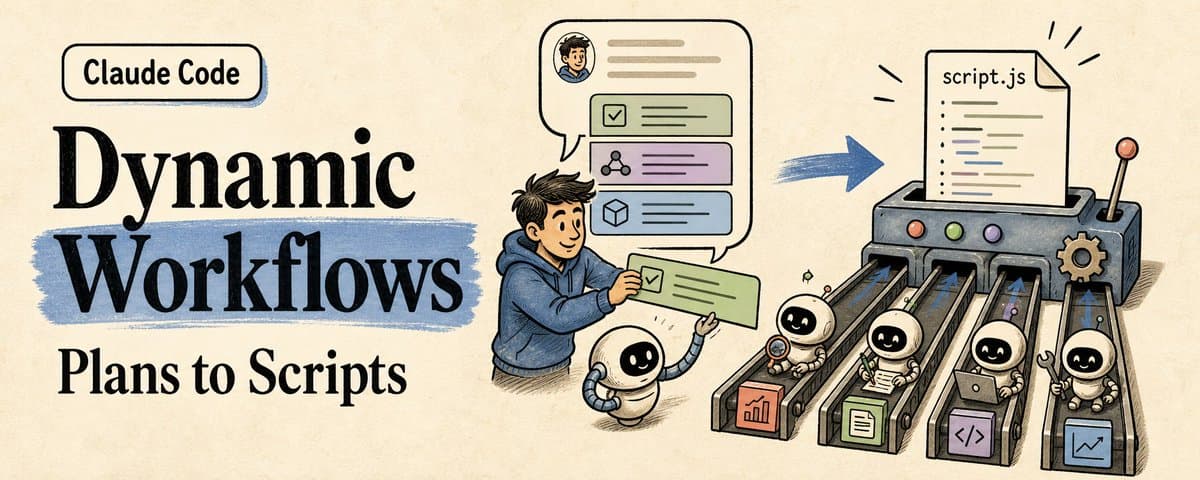
Claude Code shipped Dynamic Workflows a few days ago. Most people's first reaction: "finally, hundreds of subagents at once." That's half right. To be clear, "hundreds" doesn't mean hundreds running at the same time. The official docs cap concurrent agents at 16, with a maximum of 1,000 agents per workflow run. The real new thing is that the plan gets written as an executable script.
Subagents solve who does the work. Dynamic Workflows change something more fundamental: where the plan lives. Before this, the plan lived in chat context. Claude would think one step, act one step, read results as they came. Subagents could handle side tasks, skills could teach it a method, but the thing actually deciding what happens next was still jammed into the conversation window. Dynamic Workflows pull the plan out of chat. Claude writes an orchestration script. Claude Code executes it directly. Loops, branches, intermediate state, review chains, failure retries, all run inside the script. The main conversation gets a clean summary at the end, not the entire messy middle. Before, running a big task with Claude Code was like standing on a construction site shouting orders one by one. Dig the foundation. Done. Pour the columns. Done. What's next? The more workers you had, the more your voice became the bottleneck. Because what was really stuck wasn't who does the work, but who remembers the whole blueprint. What Dynamic Workflows do is pull the blueprint out of chat. Blueprint = plan. Foreman = workflow script. Crews = subagents. You = the client. In practice it looks like this. You type one message in Claude Code:
Claude decides this task fits a workflow. It writes an orchestration script with several phases: scan all endpoints, check each one, aggregate issues, generate a report. You glance at the phase breakdown, confirm it looks right, and it starts running. You can watch progress as it goes: which phase is running, how many agents are active, whether any permission prompts came up. When it finishes, you get a structured audit report, not dozens of scattered findings floating in chat. Anthropic picked Bun as the proof case for this feature. Jarred Sumner used it to port Bun from Zig to Rust. Roughly 750,000 lines of Rust, 99.8% of existing tests passing, eleven days from first commit to merge. The official blog also notes this port was still outside production at the time. I treat it as an anatomy specimen. This article covers the 5 rules I use to evaluate agent workflows. Each comes with a module you can take and use directly.
- First question: where does the plan live When I look at an agent workflow, the first thing I check is where the plan lives:
When the plan lives in chat, it's a thought. In a skill, it becomes a method. In a workflow script, it starts becoming a runtime object.
This table also connects my previous articles: AGENTS.md is a working contract, PLANS.md is a long-task roadmap, Dynamic Workflows push the plan one step further into executable orchestration. 2. Not every big task needs a workflow I don't open a workflow just because a task is "big." I run through five questions first:
Workflows are heavy mode. A button label doesn't need one. Unclear requirements don't need one. Strictly sequential tasks where every next step depends on human judgment don't fit either. "Big" alone doesn't qualify. 3. Good workflows are staged pipelines The Bun case, broken down, is strong because of its pipeline shape. In the official blog, the first workflow mapped Rust lifetimes for every struct field in the Zig codebase. The second workflow wrote each .rs file to match the behavior of the original .zig file, with two reviewers per file. Then came a fix loop that kept running build and test suite until both were clean. A final overnight workflow cleaned up unnecessary data copies and opened PRs. Broken down, the shape is universal:
That shape is more useful than the 750,000-line number.
- Put approval gates outside the workflow This is the most important constraint in the official docs, and the one most people will miss: Dynamic Workflows accept no regular user input while running. Only permission prompts can pause them. So wherever humans need to confirm something, that's a workflow boundary, not a step inside the workflow.
Where humans need to judge, split into two workflows with an approval gap between them. This follows the same principle I wrote about in my AGENTS.md article: stop and ask before auth, billing, DB schema, production. The difference in a workflow is that "stop and ask" becomes "end this workflow, start a new one." A related technical detail: the workflow script itself cannot read or write files or run commands. The agents it dispatches do that. The script orchestrates. The agents execute. One more permission detail that's easy to miss: subagents inside a workflow run in acceptEdits mode, inheriting your tool allowlist. File edits are auto-approved. Once a workflow starts, most file changes won't ask for your confirmation. What you should actually review is the workflow boundary and the script itself. 5. The deliverable is an audit trail When a workflow finishes, it shouldn't just say "done." I want it to hand back these:
A workflow's final output is an audit trail.
One more judgment call: if this workflow will run again next month, save it as a command. Project-wide workflows go in .claude/workflows/. Personal ones go in ~/.claude/workflows/. If it was just scaffolding for this one migration, keeping the report is enough. Don't think of it as a permanent durable workflow. The official docs only guarantee resume within the same Claude Code session. Exit Claude Code and the next run starts fresh. A Workflow Brief you can copy right now Next time I ask Claude to write a workflow, I'll hand it this:
This section is the save-worthy core of the whole article. Without it, the article is a good explainer. With it, you can use it directly next time.
Dynamic Workflows didn't give Claude Code a bigger megaphone. What changed is where the plan lives. It used to live in chat, rolling forward on context. Then it moved into documents, becoming a roadmap humans could review. Now part of the plan lives in a workflow script, starting to become a runtime object you can execute, review, and save. It's still a research preview, and it isn't for every task. But for large migrations, cross-file audits, multi-angle research, and plans that need agents to challenge each other, it gives a clearer shape. Next time you see an agent workflow, don't count how many workers it launched. Look at which layer the plan lives on. For more real-time agent building notes, follow @Voxyz_ai. Full notes at voxyz.ai/insights. Hope this was useful. Vox ❤ References Anthropic official blog: Introducing Dynamic Workflows in Claude Code Claude Code Workflow docs: code.claude.com/docs/en/workflows Claude Code Agents docs: code.claude.com/docs/en/agents
Originally on X
This piece first appeared on X on Jun 2, 2026.
X first-week signal captured Jun 10, 2026
Next step
If you want to build your own system from this article, choose the next step that matches what you need right now.
Related insights
How I run any AI voice tool through the same client delivery workflow
I've used Fish, Cartesia, Panda, Starfish, Mockingbird, ElevenLabs, and ElevenLabs V3 for client work. ElevenLabs V3 was my default for a while because it handled full sentences and emotion well. On
Read nextInstall a skill once, use it everywhere
Most of us run two or more agent CLIs now (Claude Code, Codex), and we bounce between a laptop and the cloud on top of that. I installed each skill once per CLI, then again per machine, and it got
Read nextclaude code-maxxing: treat claude code like a project loop
Most people run claude code like a smarter terminal. ask for a change. take the diff. maybe run tests. close the session. it works fine. it also wastes most of what claude code can do. what changed
Read next