
How to Quickly Recreate Any Website For Your Own Product
This morning I scrolled into DilumSanjaya's post. 1M views, 10K bookmarks. I built a version for my own product. Here's the full method and opensource repo. His original is a cell anatomy
Written by
Voxyz AI
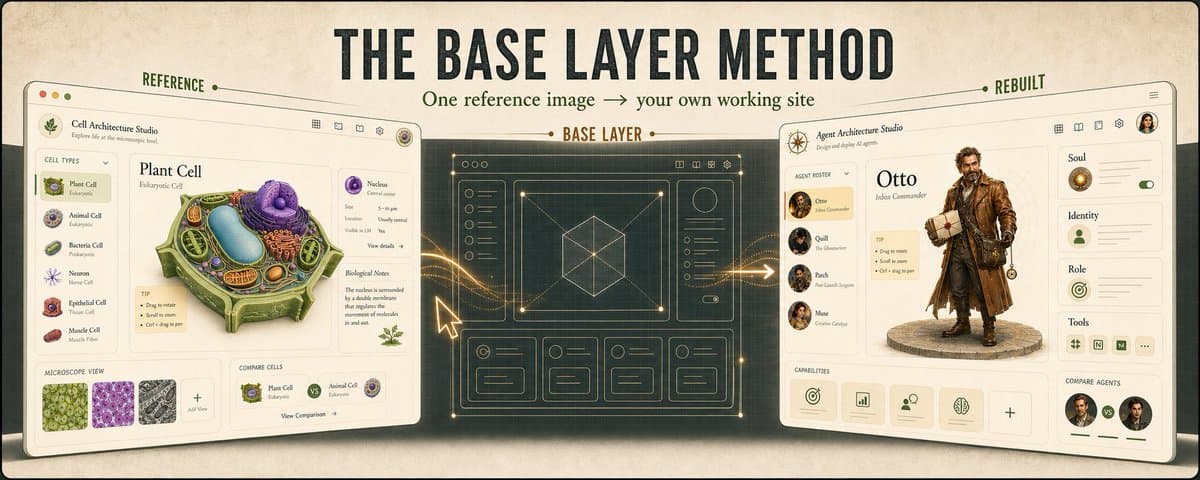
This morning I scrolled into DilumSanjaya's post. 1M views, 10K bookmarks. I built a version for my own product. Here's the full method and opensource repo.
His original is a cell anatomy illustration generated with GPT Images 2, then turned into an interactive website with a code generation tool. The 3D model rotates, click any organelle and you get the details. The details clearly took a lot of time to polish. My timeline was full of people trying to clone the cell site exactly. But I think the lesson here isn't to copy. It's to take the skeleton and build your own thing inside it. I build AI agents, so I swapped the cell structure for agent internal structure
The tools I used: GPT Images 2: generate the concept image (lock in visual direction) Tripo API: 3D model generation (signup gives 600 free credits, enough for about 10 models) Google AI Studio (Gemini 3.1 Pro): reference image + the original video → generates the website prototype in one shot. AI Studio's build feature accepts video as a reference, so the model understands what you want at the interaction level, not just from a static image. One-shot magic, but iteration caps at two rounds. Claude + Codex: design review, detail polish, API integration
Done in an afternoon. Below is the full chain and every prompt. Why Gemini for the base Honestly, Gemini's coding ability itself isn't that strong. What's actually strong is its visual perception. It accepts video input (most other major models only take images), so when you feed it a reference screenshot plus the original video together, it understands what the site looks like and how it behaves at the interaction level. That's why it nails visual fidelity on the first shot. But because its coding is mediocre, iteration breaks down fast. Quality drops after a few rounds of conversation, even with focused single-area refinement prompts. From what I've tested, two rounds is the ceiling. Anything more and it starts breaking things. So Gemini's role is clear: visual in, visual out, lay the base. Refine at most twice, then export the code and switch to another model. The base layer theory Here's the core insight of the whole pipeline: Once you have a base with a clear UI/UX direction, any model you bring in afterward will automatically respect that visual direction. Colors stay locked. Layout holds. Style doesn't drift. Without a base, if you go straight to Claude or Codex from scratch, every model improvises. The result is a mess of clashing styles. Use Gemini to set the tone (1 base + max 2 refinement rounds), then export the code and let other models handle the details. This pipeline works for any website. The flow Figure out what your business needs to display. This is step one, not finding a reference image. The original showed cell internal structure. I swapped it for AI agent internal structure: Soul, Identity, Role, Tools. If you build SaaS, break your core feature modules into cards. If you run e-commerce, turn product hierarchy into a browsable directory. If you're building a personal brand, make your portfolio an interactive gallery. Decide what you're showing first, then go find a skeleton. Find a design you like, take it apart. How many columns, color palette, information hierarchy, interaction patterns. The skeleton is generic. The content is yours. Use GPT Images to generate concept art and lock direction fast. This step is where you actually have control over the whole pipeline. Image generation takes seconds per shot. You can rapidly try different visual mappings: agent characters on the left or on top? What layout for detail cards? Stay on brand or not? Lock all of this in at the image stage. It's 10x faster than coding it up and changing it later. Concept image + prompt → Gemini, one shot for the website base. Max 2 refinement rounds, then export code and switch models.
The base prompt Feed Gemini your concept image AND the original reference video together (AI Studio's build feature accepts both). This basic template is enough:
The two "single source of truth" lines at the end matter most. Without them, Gemini improvises. It adds things it thinks look better but that aren't in your image or video. That's where it breaks. The two refinement prompts After the base lands, there will be problems. Gemini holds for two refinement rounds. Round three starts breaking what rounds one and two fixed. So you only get two chances. Each one needs to cover as much as possible.
If you still have problems after two rounds, export the code and switch to Claude or Codex. Don't keep grinding. It only gets worse. Round 1: fix the parts Pick the 2-3 roughest areas of the base and have the model fix them in one pass. Don't write pixel values or color codes. Just tell it the feeling you want. The base has already locked in the visual direction. What you want at the refinement stage is the model's own design judgment. Writing too specifically actually limits it. If you don't know how to describe a "feeling," use products you've seen as references. "As clean as Linear's sidebar." "Card layout like Notion." Use product names instead of abstract adjectives. Friendlier for people who aren't designers.
Round 2: fix the whole After round one fixes the parts, the overall coherence breaks. Round two doesn't touch the parts. It fixes the whole.
These two prompts aren't tied to any specific layout. Three-column dashboards, single-page landing pages, e-commerce product pages, all of them work. Round one picks the parts you're least happy with. Round two harmonizes the whole. From there, export the code and hand it to Claude Code + Codex to keep tuning. The result From seeing the post to shipping, I spent about 4-5 hours (concept image 30 minutes, Gemini base + refinement 1 hour, Claude/Codex detail polish 2-3 hours). First time through could take longer. But the point isn't speed. It's that this pipeline is reusable: Screenshot a design you like / download the demo video Combine your own thinking + GPT Images 2, generate options, pick the best one One shot through Gemini for the base Max 2 refinement rounds, then switch models Next time you see a website design you want to bookmark, try just building your own version. play with it here: voxyz.ai/experiments/cast repo here: https://github.com/Heyvhuang/agent-cast
Originally on X
This piece first appeared on X on May 10, 2026.
X first-week signal captured May 16, 2026
Next step
If you want to build your own system from this article, choose the next step that matches what you need right now.
Related insights
How I run any AI voice tool through the same client delivery workflow
I've used Fish, Cartesia, Panda, Starfish, Mockingbird, ElevenLabs, and ElevenLabs V3 for client work. ElevenLabs V3 was my default for a while because it handled full sentences and emotion well. On
Read nextInstall a skill once, use it everywhere
Most of us run two or more agent CLIs now (Claude Code, Codex), and we bounce between a laptop and the cloud on top of that. I installed each skill once per CLI, then again per machine, and it got
Read nextclaude code-maxxing: treat claude code like a project loop
Most people run claude code like a smarter terminal. ask for a change. take the diff. maybe run tests. close the session. it works fine. it also wastes most of what claude code can do. what changed
Read next